Sonic Screwdriver

The Sonic Screwdriver is a multipurpose tool that can be used to complete a variety of tasks.
Crafting Recipe
Name
Ingredients
Recipe
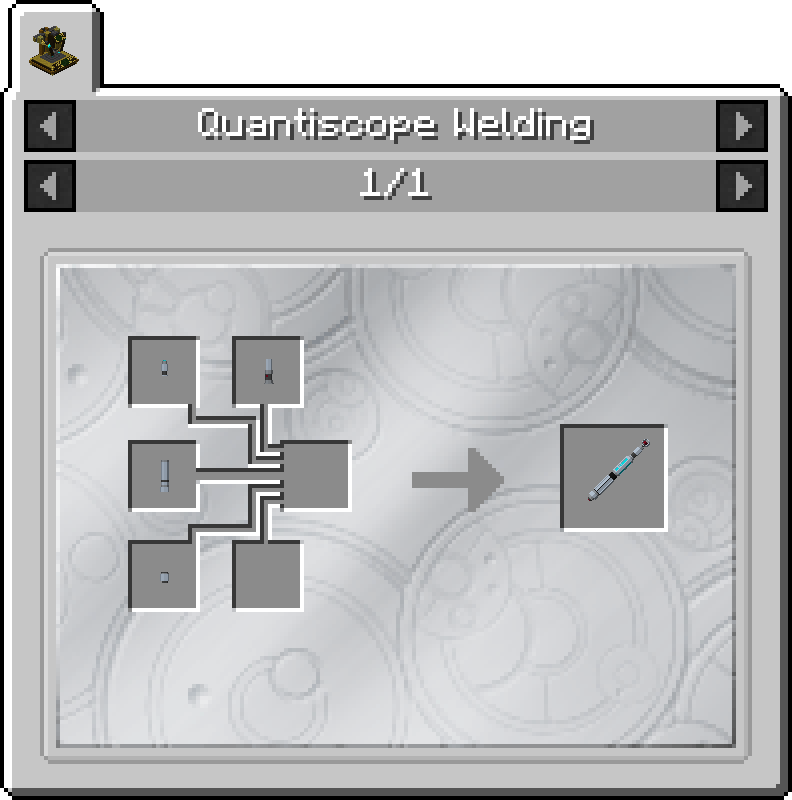
Sonic Screwdriver
Sonic Emitter
Sonic Activator
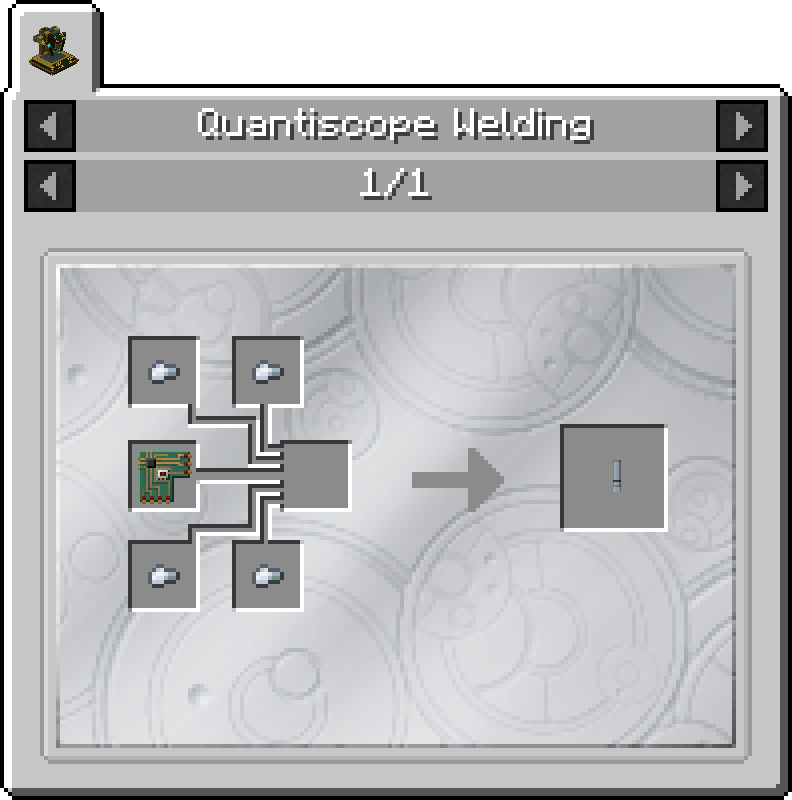
Sonic Handle
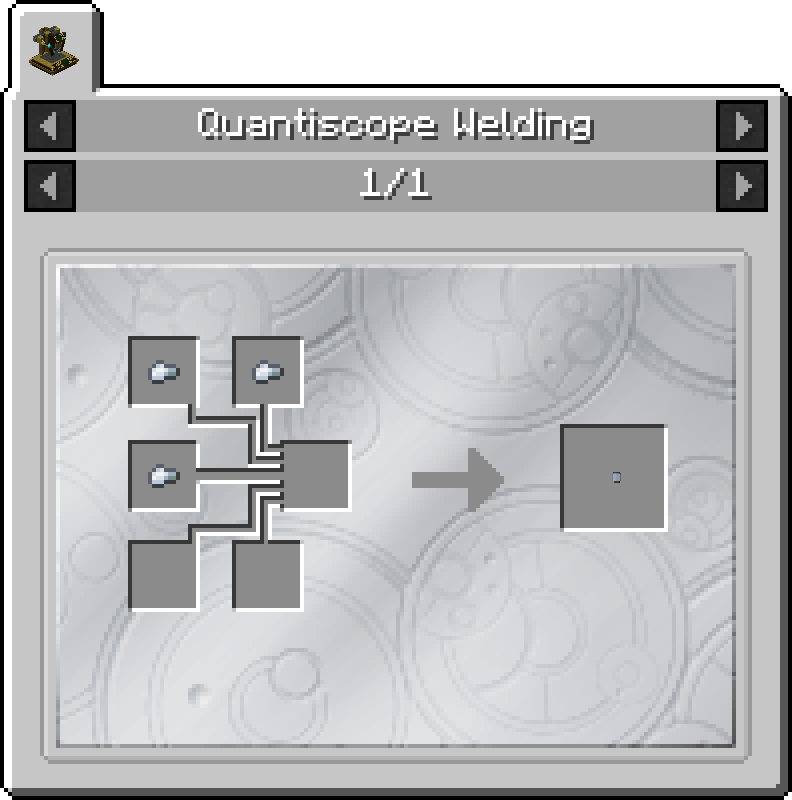
Sonic End Cap
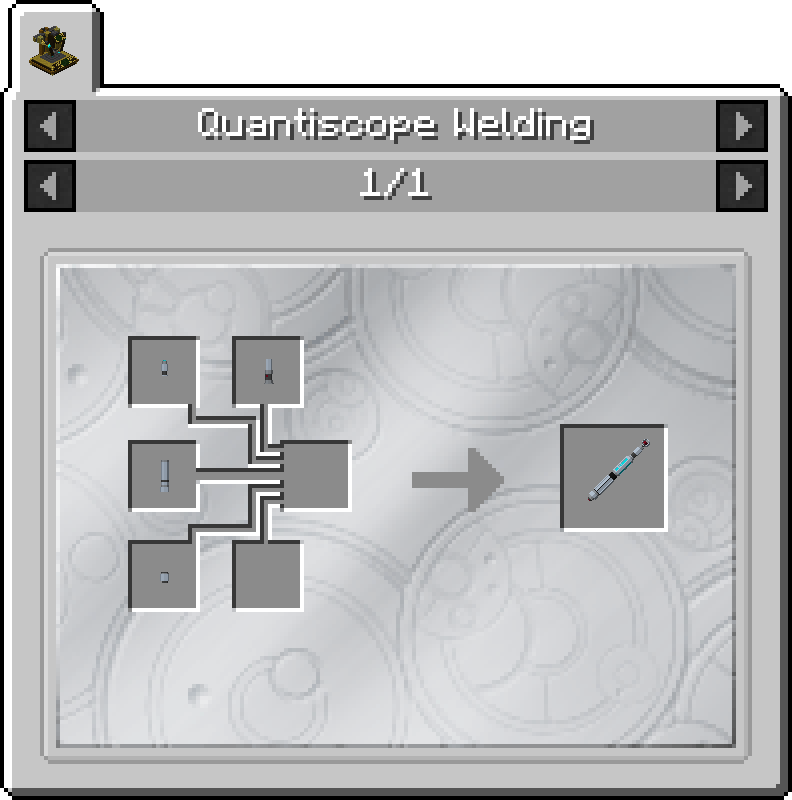
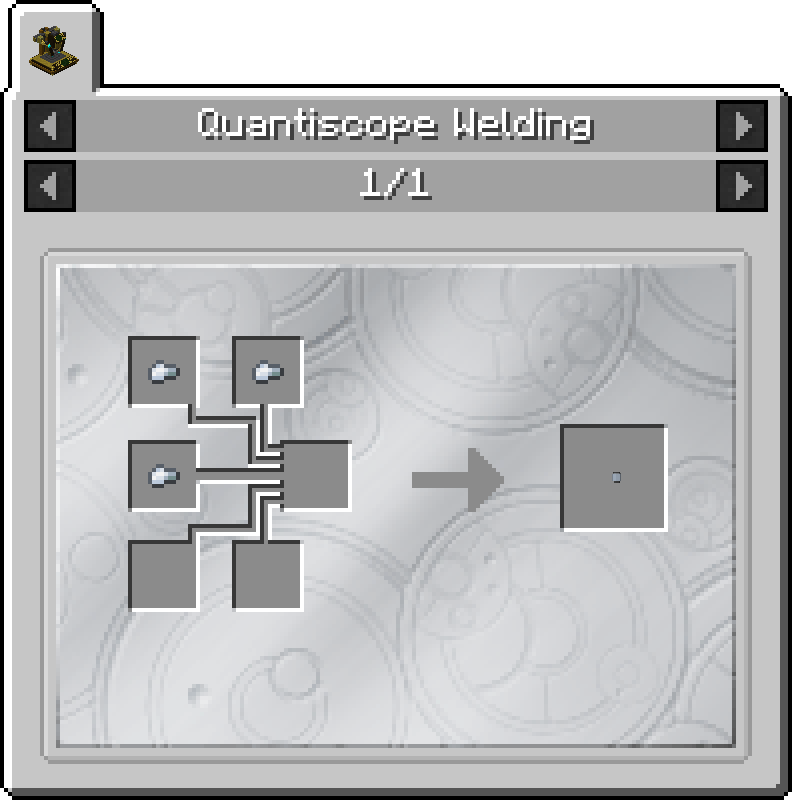
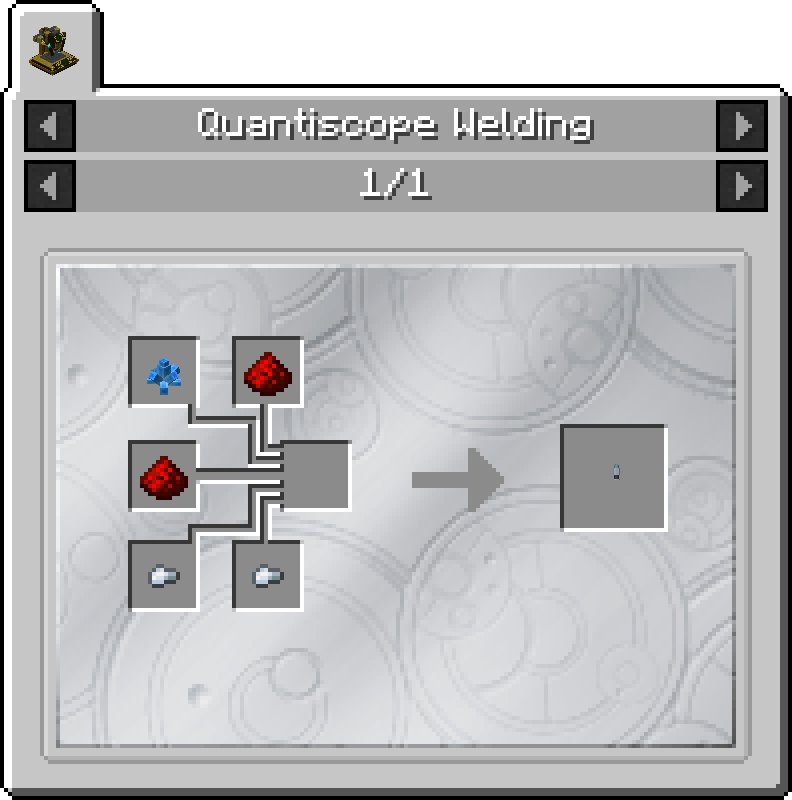
Sonic Emitter
2 x Iron Nugget
2 x Redstone
1 x Xion Crystal
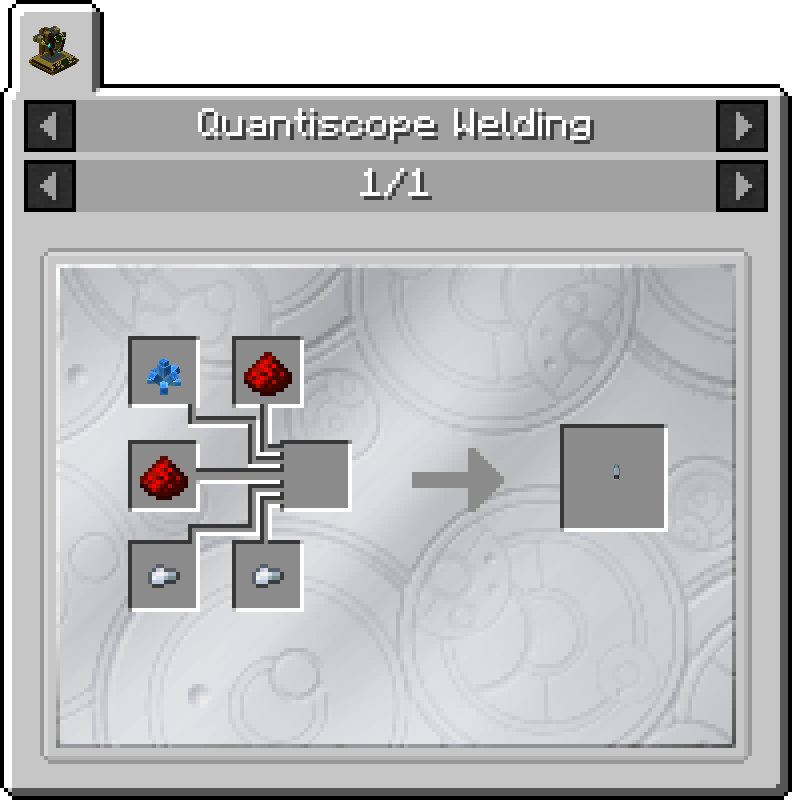
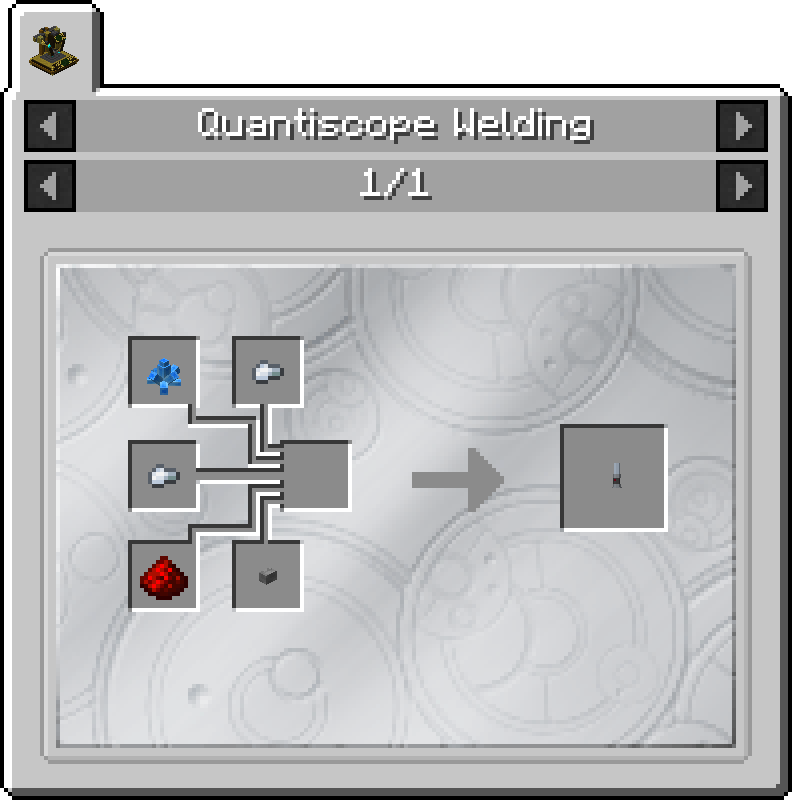
Sonic Activator
2 x Iron Nugget
1 x Redstone
1 x Stone Button
1 x Xion Crystal
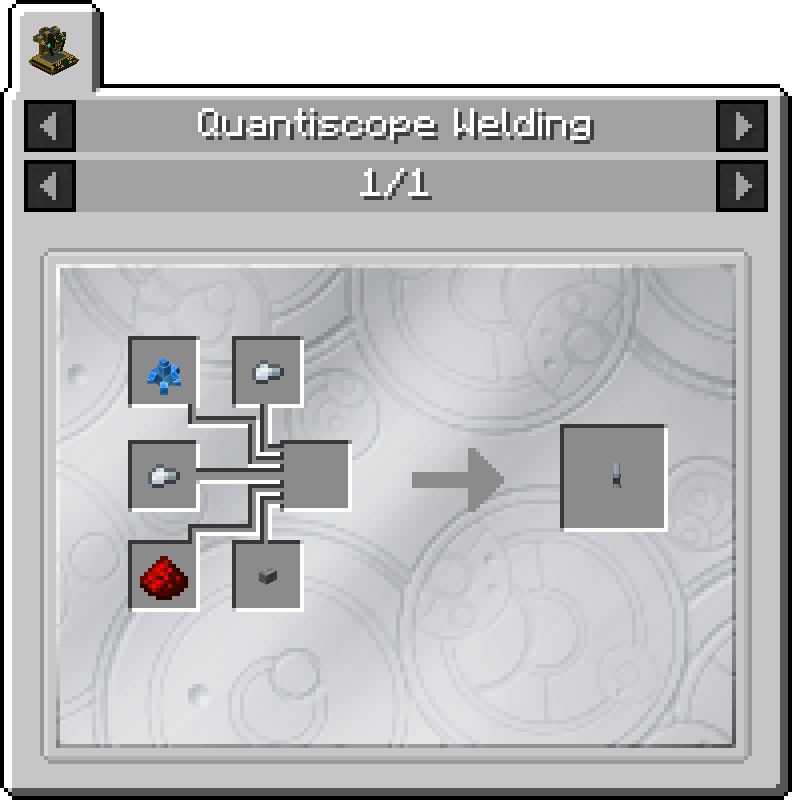
Sonic Handle
1 x Exotronic Circuit
4 x Iron Nugget
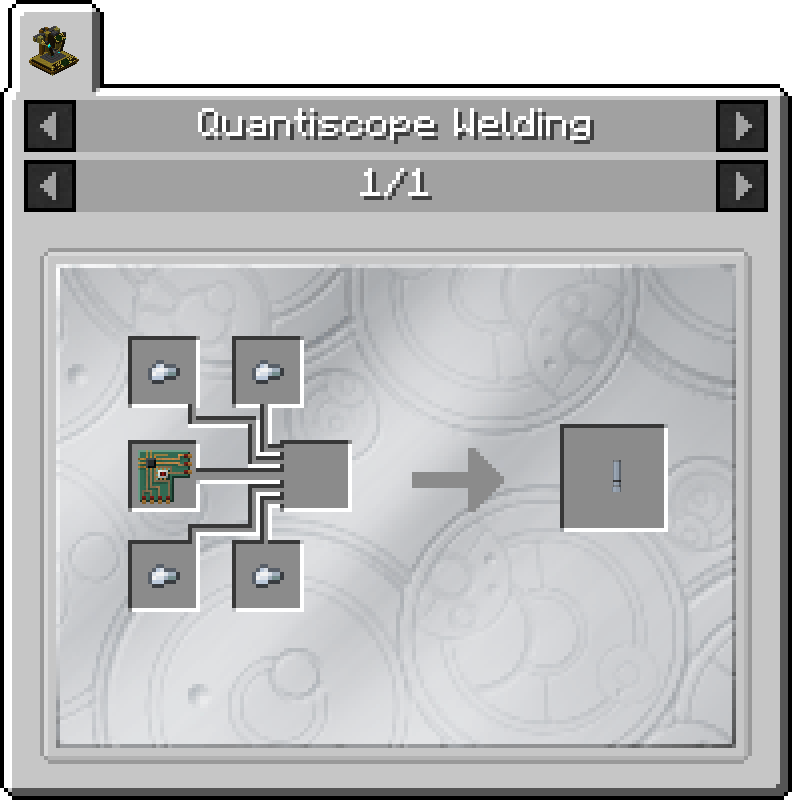
Sonic End Cap
3 x Iron Nugget
Features
Multiple, Configurable functions
Appearance can be mixed and matched with up to 28 combinations!
Can be upgraded to unlock and upgrade functions (WIP)
Consumes charges
Rechargeable
Uses
The Sonic Screwdriver can interact with blocks, entities and more! Its uses are subdivided into seperate functions. Each function is configurable using the mod's configuration file.
Block Interactions
In this mode, the Sonic Screwdriver will able to modify the behaviour of certain blocks. This includes:
Opening Iron Doors
Opening Iron Trapdoors
Turning Redstone Lamps on
Activating Dispensers
Ignite TNT
Open Transduction Barrier GUI
Entity Interactions
In this mode, the Sonic Screwdriver will able to interact with different entities. This includes:
Ignite Creepers
Shearing Sheep
Making Squid squirt ink
Dismantling Skeletons, Wither Skeletons and Skeleton Horses (Each entity will drop their respective loot with normal conditions)
Toggle Armor Stand Arms
Right Click on the corner of the Right Shoulder (from the Armor Stand's perspective)
Tardis Coordinates
This mode will allow the Sonic Screwdriver to set thea Tardis' destination coodinates. This does not bring the Tardis to those coordinates.
The Sonic Screwdriver must be attuned to a Tardis before this mode can be used
Note that this mode can be defined by the configuration file to not work in some dimensions. By default, the Tardis interior is blacklisted, meaning you cannot set the Tardis to land inside itself.
Passive Probe
This mode will allow the Sonic Screwdriver to detect if the player's current chunk position is that of a Rift Chunk.
If the current chunk is a Rift Chunk, a notification message and sound will be played to the player.
Usage
Switching between Functions
To switch between the Sonic Screwdriver's functions, hold the Sonic Screwdriver in the player's hand.
Then, hold the Sneak key (SHIFT key by default) and left click the mouse button.
A status message will appear above the hotbar which will describe the function you have selected
Using each Function
Block Interactions - Point the mouse at a valid block, then right click whilst holding the Screwdriver in the player's hand. Release the right mouse button to complete the action. If you hold down the right mouse button, the Screwdriver will not complete its action.
Entity Interactions - Point the mouse at a valid entity, then right click whilst holding the Screwdriver in the player's hand. Release the right mouse button to complete the action. If you hold down the right mouse button, the Screwdriver will not complete its action.
Tardis Coordinates - Point the mouse at a valid block, then right click whilst holding the Screwdriver in the player's hand. Release the right mouse button to complete the action. A chat message will be displayed showing the coordinates that were set. Then, return to the Tardis and take off.
Passive Probe - Put the Sonic Screwdriver in any inventory slot, and walk around the world until the Sonic plays a notification message and sound.
Mix and Match Sonic Parts
The Sonic Screwdriver can be customised to the user's wishes. Currently, it has four customisable parts, with seven variants for each part:
Emitter
Activator
Handle
Endcap
This can be done by placing a Sonic Screwdriver in the Quantiscope Sonic Customisation GUI. Use the arrow buttons to cycle through the options for each Sonic Part. Then take out the Sonic Screwdriver from the GUI slot.
Artron Charge Usage
Each Sonic action type will use a certain amount of Artron charge. The following table lists the energy usage of each action.
Action
Charge Required per Use
Opening Iron Doors
5
Opening Iron Trapdoors
5
Activating Redstone Lamp
10
Activating Dispenser
5
Ignite TNT
20
Open Transduction Barrier GUI
0
Igniting Creeper
15
Shear Sheep
15
Dismantle Skeleton
50
Make Squids squirt ink
15
Toggle Armor Stand Arms
5
Set Tardis Destination
25
Recharging Sonic Screwdriver
The Screwdriver has a maximum charge of 500 Artron Units.
To recharge your Sonic Screwdriver, place it in the Charging Panel of the Tardis Engine. When the Tardis has more than 0 Artron, it will gradually recharge the screwdriver.
Gallery

A Sonic Screwdriver with customised parts


 A Sonic Screwdriver with customised parts