
Stattenheim Remote

The Stattenheim Remote is a device that can force a Tardis to land at a particular location. While it is effective as a remote control, it is detrimental on the Tardis' health.
Crafting Recipe
| Name | Ingredients | Recipe |
| Stattenheim Remote (Blank) |
|
 |

Output:

Output:
Uses
- Summon the Tardis
- View Tardis properties
- Tardis Console Position
- Where the console is located in the Tardis dimension
- Artron Banks
- Tardis Arrival Time
- Tardis Exterior Position
- This is where the Tardis lands in the world
- Tardis Console Position
Usage
Syncing remote to Tardis/Viewing Tardis properties
Syncing the remote
There are two methods to sync a remote to a Tardis.
- Right clicking with remote on the Tardis console.
- Combine a non-synced remote with a synced Tardis key in a crafting grid.
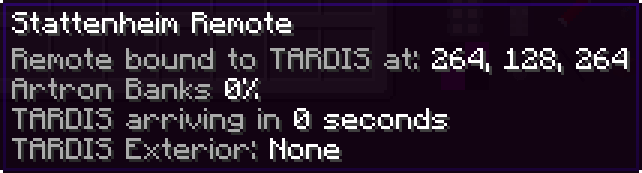
- The remote will now display a list of Tardis properties
Desyncing the remote
The user can sync an existing synced remote to another Tardis by first desyncing it.
Viewing Tardis properties
- Mouse over a synced remote while in the player inventory GUI.
|
Figure 1 - Tardis properties displayed on a recently synced remote |
Summon the Tardis
If the remote counts down the flight time but suddenly stops, either a sub-system, Artron fuel levels or Tardis Hull may be too low for the Tardis to reach the destination.
If you need to summon the Tardis to your position, crafting and using a synced remote will allow you to do.
- Sync remote to Tardis by right clicking with remote on the Tardis console or combining it with a synced Tardis key. The remote will now display a list of Tardis properties
- Right click remote on a block
-
To verify the action’s success, mouse over the remote’s “Time to destination” tooltip or the remote sound effect is played.
-
If the time decreases, the Tardis will be summoned in the amount of seconds the remote states.
-
- The Tardis will land roughly near the specified coordinates.
Notes
- Each use of the remote to summon a Tardis will deplete the Flight system’s durability by 10%
- The Tardis must fully materialise before the player can use the remote to summon the Tardis to another location.
- Multiple remotes can synced to the same Tardis.