
Architectural Reconfiguration System
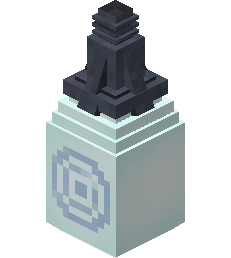
The Architectural Reconfiguration System (ARS) is a block that allows the player to obtain a variety of decoration blocks in exchange for the depletion of the Tardis' Artron banks.
Acquisition
The ARS block can be obtained by right clicking with a Minecraft egg on the Tardis console.
Each egg will provide one ARS block
Usage
- Right clicking on the ARS block will produce a GUI as shown.
- The player can then select a block by left clicking on a block shown in the GUI. This will give the player 64 blocks of that type.
- The Tardis' Artron banks will be depleted by 1% for every 64 blocks generated by the ARS block.
Notes
- By default, only the Hell-Bent Glass blocks are available.
- Players can configure the ARS to produce more blocks by editing the configuration file.
- On multiplayer, the blocks added to the configuration file will be available for all players.
- The configuration file is named "tardis_ars". This is located in the directory
.minecraft/configby default
- To add more blocks to the ARS GUI, the user must add them in the following format:
- "
tardis:[modid] : [blockid]name]".
- "
- The modid is the name given to a mod to identify them. It can be found if you turn on advanced item tool tips ingame and hover over an item
- File name: tardis_ars.json
- Blocks added to GUI: Toyota Hexagon, Alembic
["tardis:toyota_hexagon_1","tardis:alembic"]