
Tardis Console Controls-1.14
This version of the page is valid for version Alpha 0.1.0 (1.14.4)
This page is a reference for the function, location and operation of the Tardis console controls for the 1.14.4 versions.
To view the function and usage of any control, use the headers on the left hand panel.
To view a control's location on a certain Tardis console unit, see the below images.
Panel Notation
For documentation purposes, the panels on all Tardis console units can be referenced using the layout as shown below.
Console Unit Control Layouts
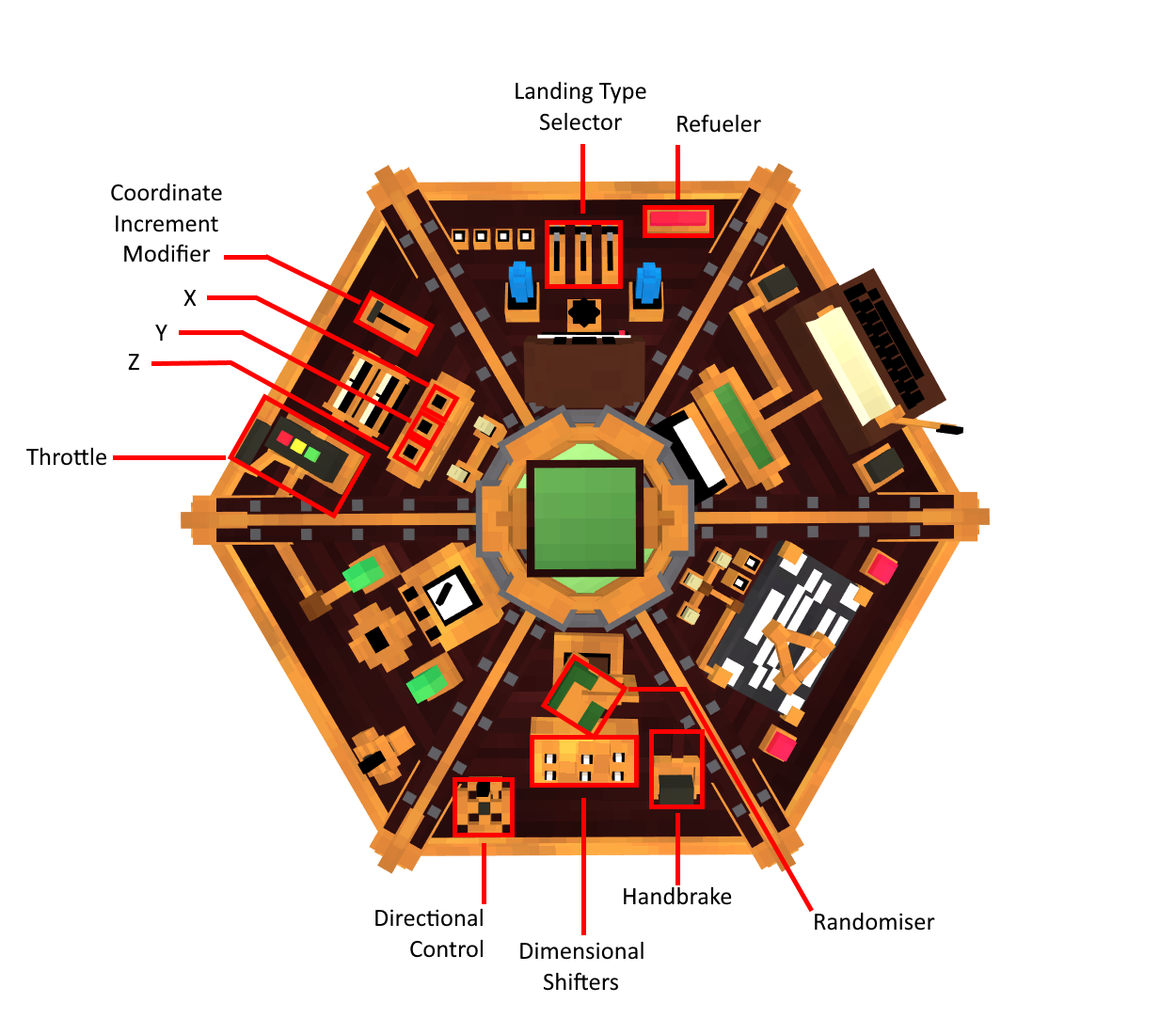

Steam (Secured Terminal Equational Astrolabe Mainframe)
Console Unit Control Layout
Nemo (Navigators Equation Mainframe Operations) Console Unit Control Layout
Controls List (A-Z)
Communicator
About
Will allow distress signals to be intercepted by the Tardis. These distress signals can be either signals sent by players or by Crashed Ship Structures.
Usage
Installing Required components
- Install the Interstitial Antenna in the Components panel of the Tardis Engine
Locating Signals
- Fly the Tardis to different locations
Travelling to the Distress Signal
- Right click the Communicator Control. If the Tardis has found distress signals, a GUI will open. Otherwise, there will be no GUI.
Ignoring the Distress Signal
- Right click the Communicator Control. If the Tardis has found distress signals, a GUI will open. Otherwise, there will be no GUI.
Coordinate Increment Modifier
About:About
This control adjusts the increment rate of the XYZ plotters.
The rates are 1, 10, 100 and 1000.
By default the increment rate is 10.
Usage:Usage
Coordinate Randomizer
About:About
This control randomizes all of your coordinates within 5,000 blocks in your current dimension.
Usage:Usage
Dimensional Shifters
About:About
This control allows you to select the destination’s dimension. (E.g. The End).
This control will be able cycle though all the dimensions in a server, and dimensions from other mods.
Usage:Usage
Notes:Notes
Door Control
About
This control allows you to open, close, unlock and lock the Tardis doors.
Usage
- Right click the control to open/close the doors
Fast Return
About
This allows your time-ship to return to the last location it landed in.
Usage
- Right click the control to set the Tardis destination to the previous location it landed in.
Landing Type Selector
About:About
This is useful if you are unsure of the potential risks at the destination coordinates. E.g. Large falls, lava pits etc.
Usage:Usage
- When you are satisfied with the settings, adjust the flight speed with the Throttle, then toggle the Handbrake to the ON state to take off.
Handbrake
About:About
This lever will toggle the Tardis’s ability to remain in its current position, which used in conjunction with the Throttle.
This can prevent the Tardis from taking off on its own if the Tardis’ mood is in a negative state.
Usage:Usage
Notes:Notes
The Tardis will automatically land, there is no need to pull the lever again
- If the handbrake is used to stop flight, it will cause significant damage to the sub systems and may trigger a negative emotional response from the Tardis
Refueler
About:About
Usage:Usage
Sonic Port
About
This allows the pilot to insert their Sonic device to receive or provide information to their time-ship. Currently it allows players to unlock the Police Box exteriors for their Tardis.
Usage
Obtain the Police Box Mk 3/ Mk 7 Exterior
- Locate a Crashed Ship Structure.
Stabilisers
About
This toggles the time-ship's Flight Mode between Unstabilised and Stabilised Flight
Usage
- Right click the control to toggle between Unstabilised and Stabilised Flight
Throttle
About:About
The Thottle controls the Tardis’ flight speed through the Time Vortex which affects its Time of Flight.
It also allows the Tardis to safely exit flight mode if they are already committed to an ongoing journey.
Usage:Usage
Notes:Notes
The Throttle must be set to 10% flight speed or more to allow the Tardis to start its flight. At the end of each journey, the flight speed will default to 0%.
A faster flight speed means the Tardis will be able to reach its destination in a shorter period, at a cost of consuming fuel at a faster rate.
A slower flight speed means the Tardis will take a longer period to reach its destination but will consume fuel at a lower rate.
Telepathic Circuits
About
This allows your time-ship to locate nearby biomes, structures and other objects within a 500 block radius.
It is also a direct interface between the pilot and the timeship, allowing both to read each other's emotions.
Usage
Biome/Structure Locator
- Right click the control to open the GUI. Select an object to search for.
Emotion Interpreter
- Sneak and Right click the Telepathic Circuits. You will receive message similar to “You feel more connected to your Tardis”
X, Y, and Z Plotters
About:About
These controls alter the Tardis' position in space by adjusting the X, Y Z coordinates.
The coordinate values can be increased or decreased. The increment rate is controlled by the Increment Modifier.
Usage:Usage